关于华为路由,,,
有多少网吧用华为的路由呢,有多少人想学华为的路由的,华为防掉线,防arp,防攻击的确是做得的很不错,不是广告,呵呵,所以..本人打算近期做几个华为的教程,(18系列的,18系列的,还有46-20的,还三层交换机S5600,二层s5000,有需要就顶一下,顶的人多的话,将在近几天完成,没什么想要的话,就不做了,
Q群:36745949 .......谢谢各网友的支持.....
希望大家多顶一下,别人贴子沉下去了,要不就找不到了,呵呵

 此主题相关图片如下: 此主题相关图片如下:
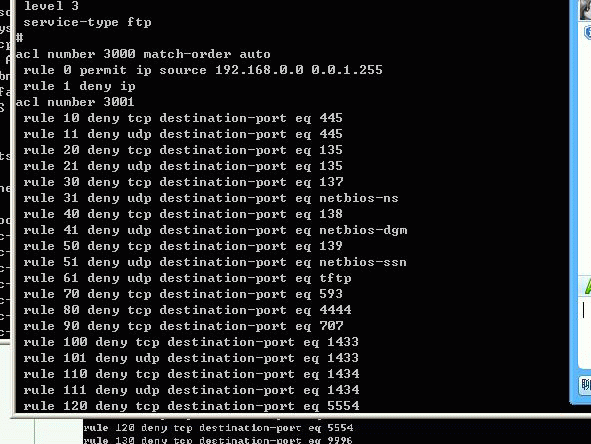
不知大家是喜欢图文方式还是视频呢。。。视频可以以个别而制作,可以联系本人,过段时间本还将放出一个更软件,
此主题相关图片如下:
穿还原,比网上的vd简单多...
如何进行中英文界面切换
AR18 系列路由器命令行接口支持中英文双语界面,可以language-mode命令用来切换命令行接口的语言环境,以满足不同用户的需求。
英文模式切换为中文模式
<Quidway>language-mode chinese
中文模式切换为英文模式
<Quidway>language-mode english
查看当前的配置命令是:<Quidway>display current-configuration
使用地址池方式做地址转换
【需求】
内网192.168.1.0网段的PC机,通过AR18-23-1上配置的公网地址池做地址转换后上公网。
这样做的目的,是让别人不知你网吧的真实ip,这样就不好攻击了。。。
【配置步骤】
新买的路由,只要用com线连接好,
local-user h3c /创建本地帐号“h3c”/
password simple h3c /设置密码为“h3c”/
service-type terminal /设置服务类型为terminal/
level 3 /设置用户优先级为3/
先设好用户.再进入设以下的。。。
tcp mss 1024
|
所在视图
|
依次键入以下命令
|
命令说明
|
|
<Quidway>
|
system-view
|
进入系统视图
|
|
[Quidway]
|
nat address-group 0 200.200.200.2 200.200.200.5
|
配置用于地址转换的地址池
|
|
[Quidway]
|
acl number 2000
|
创建访问控制列表
|
|
[Quidway-acl-basic-2000]
|
rule 0 permit source 192.168.1.0 0.0.0.255
|
配置允许nat转换的网段
|
|
[Quidway-acl-basic-2000]
|
rule 1 deny
|
|
|
[Quidway-acl-basic-2000]
|
quit
|
|
|
[Quidway]
|
interface Ethernet1/0
|
进入到lan口
|
|
[Quidway-Ethernet1/0]
|
ip address 192.168.1.1 255.255.255.0
|
配置lan口地址
|
|
[Quidway-Ethernet1/0]
|
quit
|
|
|
[Quidway]
|
interface Ethernet3/0
|
进入WAN1口
|
|
[Quidway-Ethernet3/0]
|
ip address 200.200.200.1 255.255.255.248
|
公网地址,此地址由运营商分配
|
|
[Quidway-Ethernet3/0]
|
nat outbound 2000 address-group 0
|
在出接口上进行地址转换
|
|
[Quidway-Ethernet3/0]
|
quit
|
|
|
[Quidway]
|
ip route-static 0.0.0.0 0.0.0.0 200.200.200.6 preference 60
|
配置默认路由,下一跳地址为运营商提供的公网网关
|
|
[Quidway]
|
quit
|
|
|
<Quidway>
|
save
|
保存配置
|
|
|
|
|
然后设防火墙…
进入防火墙,真接粘贴上去就行了。
acl number 3000
rule 0 deny udp destination-port eq tftp
rule 1 deny tcp destination-port eq 135
rule 2 deny udp destination-port eq 135
rule 3 deny udp destination-port eq netbios-ns
rule 4 deny udp destination-port eq netbios-dgm
rule 5 deny tcp destination-port eq 139
rule 6 deny udp destination-port eq netbios-ssn
rule 7 deny tcp destination-port eq 445
rule 8 deny udp destination-port eq 445
rule 9 deny tcp destination-port eq 539
rule 10 deny udp destination-port eq 539
rule 11 deny udp destination-port eq 593
rule 12 deny tcp destination-port eq 593
rule 13 deny udp destination-port eq 1434
rule 14 deny udp destination-port eq 1433
rule 15 deny tcp destination-port eq 4444
rule 16 deny tcp destination-port eq 9996
rule 17 deny tcp destination-port eq 5554
rule 18 deny udp destination-port eq 9996
rule 19 deny udp destination-port eq 5554
rule 20 deny tcp destination-port eq 137
rule 21 deny tcp destination-port eq 138
rule 22 deny tcp destination-port eq 1025
rule 23 deny udp destination-port eq 1025
rule 24 deny tcp destination-port eq 9995
rule 25 deny udp destination-port eq 9995
rule 26 deny tcp destination-port eq 1068
rule 27 deny udp destination-port eq 1068
rule 28 deny tcp destination-port eq 1023
rule 29 deny udp destination-port eq 1023
rule 30 permit icmp icmp-type echo
rule 31 permit icmp icmp-type echo-reply
rule 32 permit icmp icmp-type ttl-exceeded
rule 33 deny icmp
然后进入相应的内网口和外网口,下发到inbound方向
如interface ethernet 1/0
firewall packet-filter 3000 inbound
防arp,进入内网和外网接口分别加入arp send-gratuitous-arp 1
这样就不会因为arp而掉线了。
用华为的,有些人说卡,大多数是因为没限速,超出了总流量.华为的qos很灵活.
举一个例子:网吧带宽只有8M,内网PC机有200多台,很可能就是因为有人在下载或者用QQ live等软件导致内网流量过大,远远超过8M。
所以一般情况下面都需要做速率的限制,对每台PC机都做。我们处理得很多掉线问题,就是因为没有做限制速度而导致的。通过dis int e1/0看一下内网流量,如果有Overruns,则多半说明内网流量太大,路由器处理不过来了。
[Quidway]dis int e1/0
Ethernet1/0 current state :UP
Line protocol current state :UP
Description : Ethernet1/0 Interface
The Maximum Transmit Unit is 1500, Hold timer is 10(sec)
Internet Address is 192.168.1.1/24
IP Sending Frames Format is PKTFMT_ETHNT_2, Hardware address is 000f-e239-0260
Media type is twisted pair, loopback not set, promiscuous mode not set
100Mb/s, Full-duplex, link type is autonegotiation
Output flow-control is disabled, input flow-control is disabled
Output queue : (Urgent queuing : Size/Length/Discards) 0/50/0
Output queue : (Protocol queuing : Size/Length/Discards) 0/500/0
Output queue : (FIFO queuing : Size/Length/Discards) 0/75/0
Last clearing of counters: Never
Last 300 seconds input rate 220900.42 bytes/sec, 1767203 bits/sec, 572.95 pa
ckets/sec
Last 300 seconds output rate 464099.40 bytes/sec, 3712795 bits/sec, 655.10 p
ackets/sec
Input: 4414550 packets, 3834890077 bytes, 4414550 buffers
58297 broadcasts, 2 multicasts, 0 pauses
127451 errors, 0 runts, 0 giants
0 crc, 0 align errors, 127451 overruns
0 dribbles, 0 drops, 0 no buffers
Output:1206335 packets, 871172966 bytes, 1206335 buffers
955 broadcasts, 0 multicasts, 0 pauses
0 errors, 0 underruns, 0 collisions
0 deferred, 0 lost carriers
AR18-2X在升级到F1707之后,可以实现基于每个IP地址的限速。1863-1最新版本也支持该功能,命令一样。
网吧中限制内网PC的速率,上传速度200K,下载速率300K。
定义192.168.0.2 to 192.168.0.200内每台主机上传的流量
[Quidway] qos carl 1 source-ip-address range 192.168.0.2 to 192.168.0.200 per-address
定义192.168.0.2 to 192.168.0.200内每台主机下载的流量
[Quidway] qos carl 2 destination-ip-address range 192.168.0.2 to 192.168.0.200 per-address
[Quidway] interface ethernet 1/0
-------限制上行速率
[Qudiway-Ethernet1/0] qos car inbound carl 1 cir 200000 cbs 200000 ebs 200000 green pass red discard
------限制下行速率
[Qudiway-Ethernet1/0] qos car outbound carl 2 cir 300000 cbs 300000 ebs 300000 green pass red discard
使用display qos car interface detail命令可以查看内网的流量。
对外提供WWW或FTP服务
[Quidway-Ethernet3/0] nat server protocol tcp global 200.200.200.1 www inside 192.168.1.254 www
[Quidway-Ethernet3/0] nat server protocol tcp global 200.200.200.1 ftp inside 192.168.1.254 ftp
常用的命令。。。。
如何查看设备的CPU利用率
<Quidway>display cpu-usage
===== Current CPU usage info =====
CPU Usage Stat. Cycle: 60 (Second)
CPU Usage : 6% /当前的CPU利用率/
CPU Usage Stat. Time : 2000-01-01 04:55:10
CPU Usage Stat. Tick : 0x14(CPU Tick High) 0xa92edfb6(CPU Tick Low)
Actual Stat. Cycle : 0x0(CPU Tick High) 0x11e1e06b(CPU Tick Low)
TaskName CPU Runtime(CPU Tick High/CPU Tick Low)
VIDL 94% 0/10eb5340/空闲任务,表示当前CPU空闲比率/
TICK 0% 0/ 1a3b32
ROUT 0% 0/ 53801
SapT 1% 0/ 32b90e
SOCK 0% 0/ 9b481
VTYD 0% 0/ 3a98c
IPSP 0% 0/ 1fe1
IKE 0% 0/ 2328
DVPN 0% 0/ 6979
TAC 0% 0/ 52091
SC 0% 0/ 3efdd
RDSO 0% 0/ deaa
RDS 0% 0/ 3633b
ACM 0% 0/ fd6e6
LSSO 0% 0/ deaa
TRAP 0% 0/ 2ee0
DTCT 0% 0/ 23fb6b
NTPT 0% 0/ a1dfa
PIMT 0% 0/ c73a
HTTP 0% 0/ 3a98
DHCP 0% 0/ f61b
RMON 0% 0/ 7531
DHCC 0% 0/ ea63
FTPS 1% 0/ 46aeb2
如何查看内存占用率
<Quidway>display memory
System Available Memory(bytes): 32360064
System Used Memory(bytes): 18016084
Used Rate: 55%
不超过70都算是很正常。。。
因为防火墙一般内存都会占那么高的。。
如何恢复配置到出厂设置
<Quidway>reset saved-configuration
The saved configuration will be erased.
Are you sure?[Y/N]y /提示是否擦除配置文件/
Configuration in the device is being cleared.
Please wait ...
...
Configuration in the device is cleared.
<Quidway>reboot
This command will reboot the system. Since the current configuration may have b
een changed, all changes may be lost if you continue. Continue? [Y/N] Y
/提示是否重启设备,按Y将重新启动/
【提示】
1、 可以只键入reset sa,reset sa是reset saved-configuration的缩写。
2、 擦除配置文件后,必须要重启设备后才能恢复到出厂设置。
如何查看当前的软件版本
确认当前的软件版本是进行软件升级、定位问题的前提。
查看当前的版本命令是:<Quidway>display version
输出信息如下:
<Quidway>dis ver
Huawei Versatile Routing Platform Software
VRP software, Version 3.40, Feature 0112P01 /软件版本号/
Copyright (c) 1998-2006 Huawei Technologies Co., Ltd. All rights reserved.
Without the owners prior written consent, no decompiling
nor reverse-engineering shall be allowed.
Quidway AR18-20S uptime is 0 week, 0 day, 1 hour, 41 minutes
/******设备型号 运 行 时 间 ******/
Last reboot 2000/01/01 00:00:00
/*****上次重启的时间*****/
CPU type: PowerPC 859DSL 80MHz /CPU型号/
64M bytes SDRAM Memory /内存容量/
8M bytes Flash Memory /FLASH容量/
0K bytes NvRAM Memory /NvRAM容量/
Pcb Version:5.0
Logic Version:4.0
BootROM Version:7.67 /BootROM版本号/
[SLOT 1] 4LS (Hardware)5.0, (Driver)1.0, (Cpld)4.0
[SLOT 2] 1ETH (Hardware)5.0, (Driver)1.0, (Cpld)4.0
【提示】
1、 在提供版本信息的时候,请一定要提供大版本号(Version 3.40)后面的小版本号(Feature 0112P01) !
2、 必要时需要通过vrbd命令来查看内部版本号
本人打算改天出视频,希望大家顶起。。。。
|